
Give the night to the CNA at 36 of 40 weekly hours and she tips into overtime.
Nursing home scheduling software that builds the roster you review
Chrona Workforce Scheduler is shift scheduling software for Microsoft Power Apps. Set your hours per resident and rules, and Auto Schedule builds the roster in minutes.
No card. Your whole team for 14 days. 5 workers free after, always. See pricing
 Power Apps
 Dataverse
 Power Automate
 Power Platform
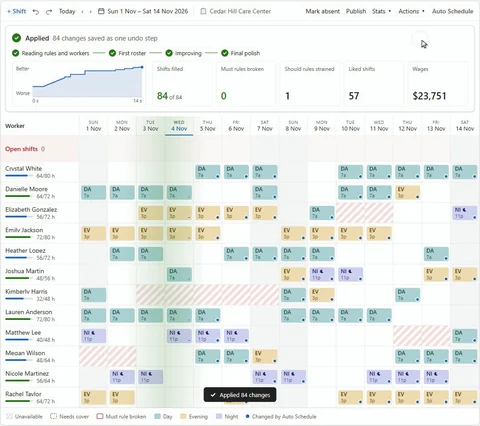
The demo could not load. Try the full recording.
A nursing home roster takes days by hand
You want every shift staffed and your week back. In a spreadsheet, each assignment changes who's available, qualified and rested later. Your judgment belongs on residents, not rechecking.

One night shift, two costs
Give it to the CNA with five nights behind her and she'll ask why it's her again.
Both cost.
Ever wonder if a better roster existed? By hand, you won't know.
Call-offs and census changes are the second job
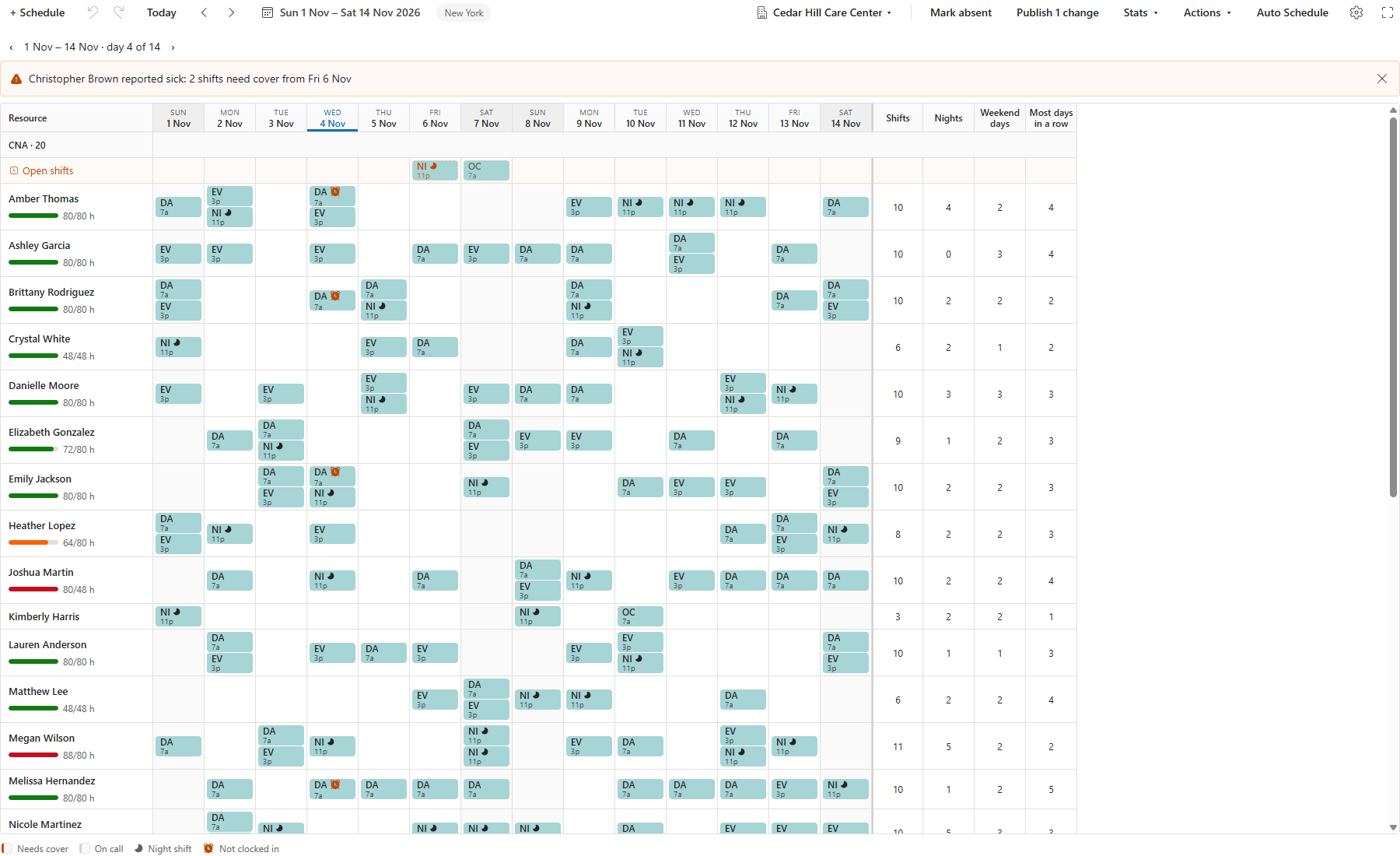
A 5 p.m. call-off sends you back to coverage, rules and who to call. The census moves, and so do each role's hours. A CNA with last week's screenshot asks which shift is current.

Chrona does the matching and rechecking
You know your team; weighing every way to staff is the hard part. Auto Schedule uses a constraint solver built on Timefold, not generative AI. It weighs thousands of combinations against roles, rules and skills like basic life support.
Your workers pick shifts, and most of the roster follows
Your CNAs pick shifts in Chrona Workforce Mobile, the worker app. Most of the roster comes from their picks; Auto Schedule fills the rest and automatically shares nights, weekends and hours evenly, period after period, so no one is stuck with the hard shifts.
From one home to a group: one run, 2,000 workers
- 2,000workers
- rostered in one run, every shift filled
- 14,400shifts
- two weeks for 2,000 workers
- 0Must rules broken
- skills, leave and contract hours hold
Measured on test rosters with skills, contract hours, pay rates and leave, every shift open at the start, on the same solver your rosters run on.
Three steps from census to a published roster
1
Bring your roster and standards.
An AI agent sets them up; you confirm each change.
2
Watch the draft take shape.
CNAs pick shifts in the app; Auto Schedule builds around them.
3
Review, publish, cover.
You publish; if a worker drops out, call-out offers their shift to eligible workers automatically.
You start on your own roster
No card. Your whole team for 14 days. 5 workers free after, always. See pricing
If you stop, nothing is locked: the board, publishing and Chrona Workforce Mobile keep working.
Rules first? US nursing home staffing rules, overtime and PBJ
Your 14 days include
- Auto Schedule for your whole team
- Chrona Workforce Mobile for every worker
- AI-agent setup from your agreement
- Your Excel roster brought in
- Payroll exports
Your first roster in the trial, or we set it up with you on a call.
Ask for your setup callWithout Chrona, every roster cycle costs more
Quiet shifts carry idle hours; busy ones need overtime. Unequal nights and little say feed turnover: a median of about 94% a year in 15,645 nursing homes, 2017 and 2018 data (Health Affairs).
Chrona for a team of ten costs US$50 a month. One overtime shift costs more.
With Chrona, you review the roster, not build it
You open a whole draft and decide what to publish. A call-off goes out automatically as an offer to eligible workers. Matching workers to demand trims idle hours and overtime, and fair nights and weekends give workers a reason to stay.

Frequently asked questions about nursing home scheduling
How do I schedule nursing home staff to meet hours per resident?
You set the hours each role needs per resident each day. Chrona automatically adds open shifts until planned hours meet that standard, and the Roster shows each role against it. Our staffing guide lists the federal and state rules, with sources.
Can scheduling software make sure only qualified CNAs get a shift?
Yes. Mark the skills a shift must have, such as basic life support. Auto Schedule gives it only to workers who hold its role and every Must skill, valid for the whole shift, and leaves it open if no one fits.
Can CNAs choose their own shifts?
Yes. With self-rostering, workers pick the shifts they want in the Chrona Workforce Mobile app before each roster. When picking closes, Auto Schedule keeps the picks it can, fills the rest against your rules, and you check and publish the roster.
What happens when a CNA calls off?
The CNA reports sick in the Chrona Workforce Mobile app. Call-out then offers the shift automatically, by app, SMS and email, to eligible workers, best fit first, level by level, until someone accepts. Nobody who would break a Must rule gets an offer. You can pause, stop or assign it.
How does Chrona share nights and weekends fairly?
Auto Schedule does it automatically. Each site chooses what it shares fairly: hours, night shifts or weekend shifts. It counts them across roster periods, so the same workers don't get them again and again. Where your agreement sets an overtime rate, Auto Schedule also keeps overtime cost low.
Can Chrona prepare our CMS PBJ report?
Yes. Integration Studio has a CMS PBJ format that writes the XML for each facility and quarter from approved hours. Map your job-title, pay-type and facility codes once, check the report, then upload it in iQIES.
More questionsFewer questions
What can CNAs do in the Chrona app?
In Chrona Workforce Mobile, workers see their shifts, pick up open shifts, ask for swaps and leave, and clock in and out. A private calendar link shares their shifts with a partner at home.
What do I need to use Chrona?
Microsoft Power Apps, and someone who can add apps to it. Your planners use the Power Apps licenses they already have. Your workers sign in to Chrona Workforce Mobile through Microsoft Power Pages.
Is Chrona a big project to set up?
No. You install two files, and a third if you want the mobile app, then add your teams, skills, shifts and rules. An AI agent can read your agreement and set up the rules for you, and you check every change first.
What does Chrona cost, and is there a free trial?
Up to 5 workers are free, always, with every feature. Your whole team gets 14 days free, no card. See pricing for what comes after.
Where does Chrona keep our data?
In your own Power Apps, in your Microsoft region. To build a roster, Auto Schedule sends us a copy of one roster period with no names and no notes. Read that copy before the first run. We keep a record of each run for 90 days, for support.
Your next roster is ready to draft
Start with your own roster and get your week back. To buy, choose Workforce Scheduler in Plan and billing in the Chrona Portal and select Subscribe.